Showing posts with label App. Show all posts

Tuesday, July 28, 2020

Snap Core First EXTENDED TRIAL!

 
Hey Tek-ninjas! I've got a quick one for you today. Did you know that Tobii Dynavox offers a FREE trial Snap Core First? If you've read my blog for awhile, you probably do - cause I write about it a lot... But, typically the trial is 30 days, but during the pandemic, the trial duration is extended to 60 days!

If you are struggling to help someone communicate - perhaps they've never had an AAC solution, or
they have other software that folks are just struggling to use/customize which can negatively impact engagement, you've got little to lose in trying Snap Core First. Snap Core First provides solutions for those who would benefit from Symbol-based, Text-literate, or Aphasia-oriented pagesets.

If it proves to be THE solution, the software retails for a mere $49.99 - all the time. Likely, you know that most other AAC solutions are retailing for 5 to 6 times that much.

You can find the free trial for Windows 10 here, or iOS here.

Go deliver a voice, it feels amazing! 


Friday, January 24, 2020

Aphasia, Text-literate, and Word List Updates!

Hey Tek-ninjas! Yesterday Tobii Dynavox rolled out a new update.

If you have Snap Core First, which incidentally retails for only $49.99 (significantly less than the competition) these updates come for free.

According to Tobii Dynavox, the Snap Core First 1.10 includes updated word lists that are more efficient to navigate. An overview of the Snap Core First word list updates, responses to key questions, instructions on how to combine existing word lists with the new words lists, and instructions on how to customize the new word lists are illustrated in these videos.

There are some considerations...

These are some pretty cool updates. If you are a current user, or supporting a current user, and you want to take advantage of these new words lists, there are some considerations:

  • What if you have not done many edits
  • What if you have done less than 75 edits to the word lists, or your edits are mainly in the Topics and QuickFires
  • What if you have done more than 75 edits to your word list vocabulary...

To find out how to address these considerations, follow this link.

But, that's not all. Tobii Dynavox rolled out a new Aphasia Pageset as well as Text-Literate Pageset, available for no extra charge. 

This video shows you how to load the different pagesets, and gives a very superficial over view.


Happy Therapy!!

Friday, June 7, 2019

The “Random Stuff”

Hey Tek-Ninjas! Today I am breaking a cardinal rule of blogging by posting more than once in a day. But I’m excited. This evening I went for a run with elite running coach Chris Bennett, and Headspace cofounder and Tibetan Buddhist monk Andy Puddicombe. I’ll expound in a bit.

You may have noticed the blurb under my title says that I write about “the intersections of assistive technology, occupational therapy, AAC, education, and other random stuff“. This article is going to be about the “random” stuff.

I am a long time runner. Never the fastest, never the slowest, kind of a “middle of the pack” guy. Before I started this job I ran marathons and trained a decent amount of hours each week. This is no longer tenable with my work schedule. So in an effort to stay healthy and fit I am now trying to run faster but shorter distances. I want to tell you about a great piece of technology that is helping make this possible.

I have been a long time fan of the app made by Nike called “Nike Run Club” or NRC for short. NRC is free. You can install it on your iPhone, but I prefer to use it on my Apple Watch, and leave my phone in the car. If you are an android user, you’re in luck because there is a version for your phone.

NRC allows you to pick training programs based on your age, your weight, and you’re running fitness: like...even if you’re running fitness level is “sitting on a couch and eating potato chips“. As you use the app over the course of a few weeks it will adjust itself based on your progress. My youngest and I used the app to prepare for the Uwharrie 20 when he was 15.

But what I have really been enjoying of late is the pre-installed guided runs. On Tuesday I ran the “Hill, Hillier, Hilliest” run with coach and ultra-distance runner Sally McCrae. She had me engage in a 27 minute program incorporating a warm-up, a series of intervals, and a cool-down. It was hard, but it was super fun.

Today I engaged in a 45 minute run with meditation on mindfulness. Yep, that
was when I ran with Chris Bennett and Andy Petticombe. Okay, so they weren’t “with” me... but do you know what that kind of training would cost in person?! And I’m soooo not fast enough to really run with those two!

I started focusing on speed a little over a month ago using the Nike Run Club app and I already feel like I’m a bit faster. But regardless of where you are as a runner: non-runner or expert, I think the Nike Run Club app can help you choose and then achieve goals, which can ultimately help you become healthier and perhaps even happier in life.

Hajimé!

Wednesday, February 6, 2019

How to install an app on an older iOS platform

Picture icon of Apple mobile device operating system
Hey Tek-Ninjas! Today's blog is a quick iOS app tip which will hopefully be useful for you.

Recently a colleague reached out to me, indicating that she was trying to download the Snap + Core First App on her mini iPad. Her dilemma was that iTunes kept telling her that she needed iOS 10 or later. Her mini iPad runs iOS 9.3.5 and would not install the newer version.

I knew there was a solution, but couldn't remember it.  Consequently, I had to send this tech-question up the ladder to my senior tech guy, my 17 year old son, Ben.

Ben quickly got back to me with the following:

So- the only way Apple will allow you to download an older version is if you already own the app. Once you find it in the “purchased” section of the App Store you can select “download” and it will give you the option to download an older version that is compatible with device

So what do we do if she hasn’t purchased it before? Go on a newer device like an
Picture of icon for Snap Plus Core First icon
Add caption
iPhone or iTunes on a Mac (the latter is preferable) that is associated with her iPad’s Apple ID and can purchase the app. Buy it from there, and then you will find it listed in the “purchased” section of her iPad’s App Store. Then you can download, and receive the “older version” 


In the specific case at hand,  my colleague needed to download the "free" version. Once she logged into her "mytobiidynavox" account within the app she gained full functionality.

I can see this issue presenting with a variety of apps, and so I hope this is useful to you all. Thanks to Ben!

Happy therapy!


ADDENDUM: 
So the clinician who asked for help emailed back to tell me she had to take a few extra steps. She shared the following:

A few extra steps were involved because essentially the newest version of iTunes on Macs does not support connections with iPad. I had to uninstall my current iTunes and re-install an older version in order for the steps from your blog to work. Essentially, the iPad is too old and iTunes is too new.

I hope this is useful for folks!

Tuesday, February 7, 2017

Reporting on your Therapy!


Hey Tek-Ninjas! Last blog I mentioned that I was excited by several of the offerings from Smarty Ears. Today, I'm blogging about their app Therapy Report Center (TRC). 

TRC seems to have been designed specifically with SLP's in mind, but I think it easily can be utilized by Occupational and Physical Therapists. If you are a clinician looking for a way to document your treatment and service delivery, this app may be the answer. TRC is compatible on your iPad. Incidentally, it's free. 

With TRC you can individually add each student you work with. You can include a photo of the student, and input the individualized goals into their profile.


The app is specifically designed to integrate with and collate data from other Smarty Ears apps, but I believe it could be used easily for tracking service delivery, and generating reports easily.  The interface is intuitive, and elegant.  Sending data via email and Airdrop is seamless. 


Per the Smarty Ears website: TRC is the perfect accompaniment for data collection in Response to Intervention (RTI). By allowing the professional to input all students (not just those on IEPs), the actual number of student’s being seen is tracked. In addition, each student’s goals are unique and individualized. Because data is tracked as often as the professional desires, TRC allows the professional to monitor interventions and the student’s progress over time. Data collection has never been easier!

So take a look at Therapy Report Center, it may simplify your work for you.

Hajimè! 

Wednesday, May 11, 2016

Abilipad: Customizable Notepad and Keyboard!

Hey Tek-Ninjas! Are you familiar with Abilipad? If not, take a look at it. I reviewed it awhile back, but only considering one small aspect of the app. More recently, I've had further opportunity to dig into this robust app, and frankly I'm astonished at just how great it is.

The word prediction function remains good. But what is truly significant is how easy it is to create
unique and custom keyboards with pictures, symbols, individual words, and even whole phrases in a "key". It reminds me in some ways for Cricksoft's Clicker, or Slaterware's Pixwriter, but at a fraction of the cost; $19.99.
Making a custom keyboard is remarkably simple. The control board is intuitive. Pictures can be added from the iPad or from Pixabay. Text can be added, which can then be read out loud by a quality computer voice when "typed" by the end user.

Built into the app are links to several tutorial videos as well as an online instructional book.

Sharing boards is easy using the built in email or DropBox access.
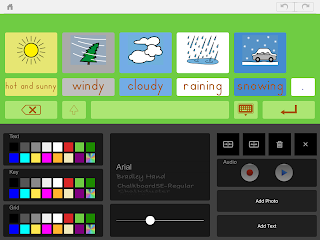
Keyboard Creation
Adding to the value, if you run into a problem, there is a direct email link to the app creator, Cheryl Bregman. She is remarkably fast in responding, and very helpful.

Abilipad is ideal for your emerging writers, or to set up with scanning and switch access as an alternative writing tool.

Features are as listed:

The adaptive notepad provides scaffolding and support:
•Distraction-free writing space
•Word Prediction (available in English, Spanish, French and German language settings)

•Set the text style (font, size and color) and background color 
•Include images from the image library or use your own pictures
•Add, duplicate and reorder pages 
•Link keyboards to effortlessly shift between from one to the next.

Text-to-speech:
•Words are highlighted as they are spoken
•Speaks letters, words and /or sentences
•AAC option with easily accessible clear text button
•Adjust the reading speed

Accessibility Features:
•Bluetooth enabled for use with a wireless keyboard 
•Insert text from emails, text documents or webpages to hear it read out loud 
•Languages include: Arabic, Czech, Danish, Dutch (Belgium, Netherlands), English (Australia, Ireland, South Africa, United Kingdom, United States), Finnish, French (Canada, France), German, Greek, Hebrew, Hindi, Hungarian, Indonesian, Italian, Japanese, Korean, Norwegian, Polish, Portuguese, Romanian, Russian, Slovak, Spanish, Swedish, Thai, Turkish

For many of us, $20 feels like a relatively big chunk of change for an app, but really, for all it does, it is a remarkable bargain!

Hajime!

Tuesday, May 10, 2016

Pogo Boards Changing the Landscape

Help!!
 Hey Tek-Ninjas! Our district has been wrestling with a dilemma. We are planning on replacing all all laptops at the Elementary level. That is roughly 10 schools. We replaced the Middle school laptops last year. It is expensive.

On top of the significant cost, this change has unplanned ripple effects. Modern laptops seem to all be dropping CD drives. Remember 12+ years ago when Apple got rid of the floppy drive? Then PC's followed suit? We all kicked and screamed 'cause our software wouldn't work. Well, here we go again. Apple started phasing out CD drives a few years ago, and now PC's seem to following along.

Our district has approximately 100 copies of "THE DOMINANT SYMBOL SOFTWARE" (TDSS) out there, which was purchased with Stimulus funding back in 2000. It still works fine, but won't on the new laptops (or not without a major process/headache per each device), especially as we are changing OS platforms at some schools.

Our staff who use TDSS really rely on it. But, upgrading TDSS for the new computers would cost over $12,000 PER YEAR!

Home Screen
So, it was out of necessity that I started shopping around again for symbol software, but this time more earnestly.

Enter Pogo Boards. Pogo Boards is an online, subscription model which is easy to use, and provides access to millions of images through an integrated Google search, thousands of unique, custom symbols with SymbolStix and the PiCS symbol set.

Pogo Boards arguably has the most robust symbol library available in one place.


There is a free 14 day trial to get a feel for PogoBoards, and I encourage users to sign up and use it with a student or classroom in mind, not just to tinker around. This process will facilitate you actually learning how to use it.

iPhone
The PogoBoards website offers several "how-to-videos" to help you in your learning curve.

As a user, if you are at all familiar with Microsoft Word, the interface will be intuitive. It looks similar.

The bottom line though, is the price is down-right affordable. My subscription for the same group of folks on the TDSS will be roughly $2,500 annually. Thates a significant savings.

Users can make their boards on a Mac at work, then when they get home, feasibly log into a home PC or Linux computer and access the same work.  Cross platform is huge.

In addition, boards made online can be downloaded to the free app on your iPad or iPhone.

And finally, sharing of materials within a school or district is simple.

Change from a preferred tool is often challenging. My hope for our district is that this won't be too painful. I will keep you all posted!

Hajime!

Tuesday, February 23, 2016

Choose It! Maker 3: A good choice for individualized learning materials

Hey Tek-Ninjas! Those of you who have been in the field for awhile will remember Choose It! Maker
(CIM). Originally CIM was software you installed onto your computer. CIM allowed users to create customized learning materials relatively quickly using personal photos, symbols, text, and sounds to create any cause & effect or choice making activities you could imagine.  The end product would then be used on the computer it was made on.

Well, the folks at HelpKidzLearn have made the product more powerful, while also easier than ever to use. Now, Choose It! Maker 3 is an online, subscription based product. You make customized learning materials in minutes which can be accessed by any computer (PC, Mac, Linux) with internet capability, as well as on the free apps available for your iPad or android tablet.


Subscriptions are available for individuals or larger organizations. 
Individual: $99 annually
5 users:  $159 annually
Site location:  $219 annually
District: available based on size of district. 

Hajime!

Wednesday, December 9, 2015

The Seuss Prescription

iTune Books
Hey Tek-Ninjas, as a child I was a fan of Dr. Seuss. Today,  I still am a fan.  There have for some time been a number of his books available for iDevices and other platforms. The books are chock full of interactive features that are sure to interest young learners. The books come at many different price points, some with "in-app purchases", and occasionally a few free. 

These books allow for reading along with highlighted narration, read it yourself, or to utilize auto play. You may want to equip your students with headphones if they are using the app during reading time. You may also wish to use Guided Access, to make sure inquisitive explorers from leaving the app for other activities.

Touch a picture, gets names
The "books" encourage users to tap on the various aspects of the pictures, exposing the reader to concepts of rhyming, phonics, and reading comprehension. Eventually, on each page you can find a star which opens a learning component. 

Spelling
Most recently I revisited the iPad version of Green Eggs. It is an engaging take on the classic. Your students will want to come back to it more than once. 

Take a look at the many offerings and see if Dr. Seuss might help some of your readers in class!

Happy therapy!

Friday, March 13, 2015

A Little Help FOR Our Friends...

Hey Tek-Ninjas, don't we love it when we find a great app? How about when we like an app a lot, and make a suggestion or two, and those suggestions get incorporated in the next update? How cool is that?!?!

Well the good folks at ModMath built an amazing app. I wrote about it awhile back (read my blog here).  They built it originally with their own son in mind, but to date around 27,000 people have downloaded it, so clearly, we like it. And, folks are making a lot of great suggestions for various updates.

I really like this app. It is a stand out because it allows math students to complete their assignments without writing out answers longhand. And it's purposefully built sans calculator so the teacher can see if a student doesn’t understand the concept, or has simply made a computation error.  The app builders, Dawn and Josh Denberg could feasibly leave the app as it is, and walk away feeling successful. However, they would like to make it better, and they want to incorporate many of the ideas users have suggested. In order to do so, they will need some money. They indicate that "An upgraded ModMath 2.0 supporting advanced algebraic equations is about $25,000. An Android version with the exact same features will cost $30,000".

Dawn and Josh have started a ModMath Kickstarter campaign.  For this first iteration, they are asking for $20,000 and in about a day, they are already half way there!

If you like ModMath, if you would like to see a more powerful/robust version of ModMath, or simply need a worthy place to donate, consider supporting their fundraiser! Also, be sure to "Like" their Facebook page.

Happy Therapy!

Friday, March 6, 2015

Favorite Apps of a Dozen School Based OTs: Visual Motor/Visual Perceptual, pt. 3

This is part three of Favorite Apps of a Dozen School Based OTs. You can read part one here, and part two here.

Visual Motor:
Dexteria: $3.99, Refer to my blog article. Dexteria is a set of therapeutic hand exercises (not games) to improve fine motor skills and handwriting readiness in children and adults. Dexteria’s unique hand and finger activities take full advantage of the multi-touch interface to help build strength, control, and dexterity.
Just Find It: $0.99. You are presented two images almost identical but at most 4 different spots. If you find all the differences in each stage before the countdown timer runs out, the remained time will be added to your score. Be careful! Wrong spot means time penalty! But you will be relieved to know that some unused item is left!
Bugs & Buttons
Bugs & Buttons: $2.99. Bugs and Buttons 2 seamlessly incorporates numbers, letters, patterns, shapes and so much more into 18 exciting games and activities. Use a rubber band to bounce falling buttons and acorns away from a parade of marching metallic green beetles. Fine-tune your motor skills in a high-speed race on a remote-controlled car gaining speed boosts, avoiding obstacles, and running competitors off the road. Practice your listening skills in a fun game of “Simon Says” with a funky, button covered puppet! Learn to play popular tunes or record songs of your own with a working keyboard. Guess the shape as a water bug creates geometric ripples on a gorgeous, three dimensional, babbling brook.

Visual Perceptual:
Injini
Shape Builder: $2.99. Shape Builder educates & entertains your little one with easy to move shapes that snap into place on top of silhouette puzzles. Each puzzle has 5 to 10 pieces & after positioning all of the pieces, the real image is revealed along with a professional voice recording of the word spoken by a licensed speech therapist that specializes in early child development. Shape Builder encourages cognitive thinking & fine motor skills plus exposes young minds to new music instruments, animals, produce, objects & the alphabet in a fun & engaging format with LOTS of sound effects!
ShapePuzzle: Free, Shape Puzzle is a jigsaw puzzle especially designed for little children. After you complete a picture, a cute turtle will pops out and tell you the name of the object you just assembled. What's more, each object belongs to a certain scene and after you finish all the items, a vivid scene appears!
Injini: $29.99, 10 feature games with 90 puzzles, over 100 beautiful illustrations, 8 farm-themed mini-games and more. Injini is ideally suited for early intervention - it brings fun to learning and at the same time practices children’s fine motor and language skills, understanding of cause and effect, spatial awareness, memory and visual processing.

Kids Can Match - Animals...: Free, An interactive, adaptive and fun memory game for children of all ages. This app contains an amazing, one of a kind, collection of over 70 authentic animal images and sounds.

Happy Therapy!

Thursday, March 5, 2015

Favorite Apps of a Dozen School Based OTs: Story Telling and Typing (pt. 2)

Hey Tek-Ninjas, this is part two of Favorite Apps of a Dozen School Based OTs. You can read part one here.

Story Telling:
Pictello
Pictello: $19.99, Everyone loves to tell fun, engaging, and imaginative stories. Go ahead and make a social story or visual schedule for a child with autism or a slide show of holiday pictures for your friends - Pictello makes it a breeze to create and share! Whether you use the included natural-sounding Text to Speech voices, or record your own voice, Pictello is the perfect tool for visual storytelling.

Toontastic: Free, Refer to my blog article. Toontastic is a creative storytelling app that enables kids to draw, animate, and share their own cartoons with friends and family around the world.

Comic Life
Comic Life: $4.99, Refer to my blog article. Comic Life isn't just for creating comics.

You can retell a family vacation or capture a special day using your photos. It's simple to do: just drag photos onto the page and add your text in speech balloons and captions.

Voice Dictation with Siri: Standard on iPhone 4s or later, iPad 3rd gen or later, iPad mini, and iPod Touch (5th gen). Siri seems to work better with my students then some of the most expensive voice dictation software. Good blog article here. 

Typing:
Pictello: $19.99, Everyone loves to tell fun, engaging, and imaginative stories. Go ahead and make a social story or visual schedule for a child with autism or a slide show of holiday pictures for your friends - Pictello makes it a breeze to create and share! Whether you use the included natural-sounding Text to Speech voices, or record your own voice, Pictello is the perfect tool for visual storytelling.

Abilipad: $19.99. Refer to my blog article. Abilipad is a customizable keyboard and adaptive notepad, with word prediction and text-to-speech.

Snaptype: Free, Refer to my blog article. SnapType helps students keep up with their peers in class even when their penmanship holds them back. Students can easily complete school worksheets with the help of an iPad or iPhone.

Turbo Type
Typing JR: $ 0.99. The fish are swimming towards a shark. You'll have to save the fish by typing in the word, before they get eaten by the shark. Fun and hectic game for the kids, where they learn how to typ.
Turbo Type: $1.99. Race to the finish and turbocharge your iPhone typing skills!  Battle the ruthless CPU opponent in a no-holds-barred typing race across expansive retro-styled scenery and environments, attempting to keep up with the randomly generated sentences and stay ahead of the enemy racer by avoiding deadly mistakes.

Be on the look out for part three of this blog soon.

Happy Therapy!

Wednesday, March 4, 2015

Favorite Apps of a Dozen School Based OTs: Letters/Writing/Drawing Practice (pt. 1)

Hey Tek-Ninjas, back in June of 2012 I wrote a blog titled “Favorite Occupational Therapy Apps”. Several years later, it remains one of my most consistently visited blog pages.

Many of the apps are still some of my favorite, however I am not working directly as an OT anymore. Instead, I am serving my district solely as an Assistive Technology Professional.

Recently a colleague sent an email out to the Occupational Therapists in our district, asking what were their 3 most often utilized iPad apps.

I plan to share the responses in a four part blog.

This is not necessarily my endorsement, but rather the endorsements of several very skilled and experienced Occupational Therapists working directly in a public school setting. 

Letter/Writing/Drawing Practice: 
iWriteWords
Letter School: $4.99, Play to learn how to write all letters of the alphabet: abc - xyz and the numbers 1-10 with LetterSchool. Kids practice essential skills as they play four exciting games per letter or number.

Handwriting Without Tears: $6.99, Make handwriting practice fun! With our Wet-Dry-Try Suite App, children learn and practice correct formation habits for writing capitals, numbers, and lowercase letters. The app simulates our Slate Chalkboard and Blackboard with Double Lines and helps children learn handwriting skills in the easiest, most efficient way. The result truly is handwriting without tears!

Doodle Buddy: Free, Doodle Buddy Gold is the most fun you can have with your finger! Finger paint with your favorite colors and drop in playful stamps. Connect with a friend to draw together over the Internet.

WriteMyName
Write My Name: $3.99, Write My Name is a fun way for children to practice writing letters, words, names and phrases. Write My Name supports children ages 4 through 6 to learn how to write their name, trace uppercase and lowercase letters, and write over 100 familiar sight/Dolch words. Write My Name meets some of the basic reading and writing Common Core State Standards for kindergarten such as the introduction and mastery of print and word recognition concepts.

Snaptype: Free, Refer to my blog article. SnapType helps students keep up with their peers in class even when their penmanship holds them back. Students can easily complete school worksheets with the help of an iPad or iPhone.

Ready to print: $9.99, Ready to Print progresses through the pre-writing skills in a specific order, so that children can master the visual-motor, visual-perceptual, and fine motor skills necessary for correct printing patterns. It is designed to teach children the correct patterns for printing, and to avoid bad habits that are difficult to change as the child gets older.  

iWriteWords: $2.99, Refer to my blog article. iWriteWords teaches your child handwriting while playing a fun and entertaining game.

Look for the second installment soon.

Happy Therapy!

Wednesday, October 15, 2014

Closing the Gap: Day One, weeeeee!

Day one of Closing the Gap Assistive Technology Conference here in Minneapolis. WOW! So much great stuff to see and learn about.

I spent the morning wandering around the vendors booths, seeing old friends, and making new ones. Technology has come a long way folks!

So many great products available.

I had a chance to talk with Mel Dashner, VP of Origin Instruments, and the switch interface equipment they are making is really terrific with paletable pricing.

I also spent some time with Lalitha Nagarajan, ther Director of invention labs, creator of Avaz, which I reviewed awhile back. They have some really terrific upgrades to Avaz which I was not aware of, and some amazing apps in development. Keep an eye out for new products from them!

Also, I spent some really valuable time with Mauricio Meza of Komodo, makers of the Tecla Shield. Expect a review of their very sophisticated switch interface soon.

Finally, I had the opportunity to talk with Dwayne and some of his "art assistants" from Zot Artz. Really fun work happening there. I hope to get back with Dwayne this week and learn more about their program.

I gleaned quite a bit from Sarah Herrlinger, Senior Product Manager from Apple regarding Accessiblity Features in Apple's iDevices. Some of this was "basic" info for me, but some of it really clarified how the accessibility features can work. I hope to blog about some of this more later.

The stand out seminar for me so far was with Denise DeCoste, creator of the Writing Protoco.  l which will soon be available from Don Johnston. I hope to take a closer look at her assessment tool soon.

So, I'm finishing lunch now, and heading back down soon.
Happy therapy!

Tuesday, October 14, 2014

Reposting: A favorite app: iWrite Words

Back in 2012 I wrote about iWrite Words as one of my favorite apps. It continues to be one of my favorites, and so I thought I'd repost this write-up!

There are a lot of great apps which help kids learn and practice letter and number formation. However, like most Occupational Therapists, I am particular about how students form their letters and numbers.  Many apps form letters haphazardly, or at least not consistently from the top down.  iWrite Words starts letters just like a Miata... Top down baby!

Compatible on all iDevices, iWrite Words is 81.1 MB. The app retails for $2.99, and there is a lite version which is free.                 

iWrite Words dovetails nicely with the handwriting work I do with my students. The graphics and sound effects are engaging and playful. I have used it in sessions with a single student, and I've used it in groups of up to four students (each student using a iPad or iTouch). 

Upon opening the app the user is presented with options to trace upper-case, and lower-case letters, short words, and numbers.  The user drags a crab along the character outline.  If the user's finger deviates from the proper course, they hear a "boing", and start the character over. After tracing the character successfully, the user must drag the character into a spinning star shaped hole.


If the student is stuck, he can click on the play icon and see the character traced in animation. In addition, there are a number of ways a therapist/teacher/parent can custom tailor the app to the users needs. Customization includes many options, but to name just a few, the adult can change difficulty (tracing path size), and handed-ness.  In addition, the app allows for changing letter formation style. Without naming some of the more popular teaching methods, to the discerning eye, it becomes evident what they are offering. One can also change the gender of the voice that offers directions and affirmations.  


A final nice touch is the alphabet song which sings out with each tap on the screen.

Overall iWrite Words is a terrific app. It's appealing to my students, and an excellent tool to augment my handwriting work.

Happy therapy!

Wednesday, February 19, 2014

Quickly Creating Quizzes...

Library of Quizes
Recently I was looking for a tool which would allow me to quickly create a multiple choice series of questions for a student. After scanning the internet a bit I stumbled upon Quizmaker, by Benno Lauther.  Quizmaker is an iPad only app.  The app is described in German which gave me a little bit of pause as I don't speak German,  as was the app support web-site.  Because of this, I was not entirely sure it was what I wanted. But, at $1.99 I decided to take the plunge. It was definitely worth it!


Quiz Creator
Quizmaker is intuitive, and fun to use. The graphics are sweet, with vibrant colors.  The ability to import photos from your photo album is easy.  Using Quizmaker, a series of multiple choice questions can be generated on the fly. Each question has 3 possible answers, and you can create written or audio questions (or both), as well as custom audio responses.  Wrong answers can be customized to have a audio response, or no feedback.  Creating and editing your content is a breeze.  Question sets can be saved to use at a later date, which is a significant plus for educators.  
A Quiz

What I would like to see is the ability to scan the answers, so my switch users could access this app. Then, we would have a really significant product for such a population. The app developer emailed me this link for English support. 

Overall, this is a great tool for educators and therapists to use as an alternative writing tool for tests or quizzes. 

Happy Therapy!

Sunday, December 22, 2013

Co-Writer continues to set the Standard

Years ago, I asked a Don Jonston sales rep when the company would put forth a word prediction for the iPad. He said "never", indicating that iPads did not have enough muscle to do true word prediction. Well, since then iPads have become far more powerful, and Don Johnston made a Co-Writer app.

For those few of you who don't know about Co-Writer, it is the industry standard for word prediction, a go-to tool for Occupational Therapists working with students who are confounded by the writing process. It has been available for Macs and PCs since before I started working as an therapist 14+ years ago.

Flexspell at work
The Co-Writer app retails for just under $18.00. While this is a bit more than some of the other tools out there, the power of the app is worth it.

Word Prediction
The very powerful Flexspell, and Topic Dictionary features really separate this app from its 
competition. Flexspell is Don Johnston's phonetic or inventive spelling feature that deciphers the most creative spelling.  The Topic Dictionary really shines as well, especially the ability to create a quick topic by adding the word, and it essentially "scrapes" the internet to create a word bank.  
Word Bank sizes
Another terrific feature is the ability to set the level of the dictionary for each user, based on the size vocabulary they might be using.this function alone is missing from most of Co-Writer's competition.

The word prediction works just like I'd expect from Don Johnston: very well. Word choices are offered above the keyboard. Swiping an offered word to the right, I can hear it read aloud before I choose it.

The Co-Writer app is very simple, intuitive, and powerful. Once again, Don Johnston has set the industry standard for word prediction. Now it's available on your iPad!


Happy therapy!

Thursday, December 19, 2013

Quick iTip

With iOS7.0.4 on your iDevice

Did you know: within Settings if you go to iTunes and Apps Store you can now turn on Automatic Updates and app updates download and install automatically.

This makes remote management that much simpler!

Happy Therapy!

Monday, December 2, 2013

An Elegant Chrome-based Reading and Writing Solution

My school district is struggling with the question of "how do we afford to replace our teacher laptops"? Every organization struggles with this eventually. Best practice suggests replacement every 3-4 years. That, as you can imagine can get to be very expensive. One option we are considering is the variety of Chrome laptops. As a linux-based operating system which utilizes web applications Chrome products are often relatively inexpensive ($200 to $500), fast, and capable.

The primary concern that I have, is making certain that my staff are able to take advantage of the various special software that we've grown accustomed to using, including read aloud, word prediction, and symbol software. More and more companies are addressing this issue, increasing the functionality of Chrome laptops.  Such products do exist, such as word prediction by Appwriter, and Google's Screen Reader, but these are stand alone extensions. 

TextHelp, veteran software designers for our EC students have developed a terrific app or "extension" for Google Chrome called Read&Write for Google (RWG).  RWG works on PCs, Macs, and Chrome-books. RWG is incredibly robust, rolling together word prediction, read aloud, highlighters, vocabulary list building, dictionary (with picture symbols), annotation tools, translation, and navigational tools into one product.

The RWG tab is built right into your Chrome browser, and you can open or close the app with a click. The word prediction is powerful, with good phonetic spelling. In addition, the user can determine how many word choices are offered. 
Symbol Definition

The dictionary is excellent with the ability to provide symbol based definitions, or make a direct Google search. 

There are 4 different highlighters, and the ability to "collect" highlighted colors in groups. From those collected words, the user can build a vocabulary list with definitions provided. 

The read aloud voice is of good quality, not too robotic sounding, and the pace of reading can be customized. 


Premium subscriptions are available for single users, groups of users, or domains.  Not sure? Well, the good folks at Text help offer a 30 day fully functional trial to see if the product is for you.


I would like to see a tailorable dictionary for the word prediction such as beginner vocab, medium vocab, and advance vocab. Also, a small nitpick detail, is that when I see the numbers next to the word on the word prediction choices, my inclination is to pick the number off the keypad to make my choice. This only types the number. So, I'd like the software writers to either remove the number, or give me the ability to "turn it off".  Those are my only two criticisms of RWG. 

Read&Write for Google is a very powerful addition to the Chrome experience.  It is one of the apps that makes the Chrome-book a viable option for the special educator. Speaking with a representative of the company, they are already anticipating specific improvements to come to this first iteration.  If that is the case, this very capable add-on will be a "must have" for your Chrome browser or Chrome computer. 

Happy Therapy!

Friday, October 25, 2013

Word Prediction with Google

Lingapps apps creates apps for iDevices, Android platforms, and Google Docs. AppWriter provides word prediction and text-to-speech.  For your pc or macbook, the app is sold as a subscription for $12 annually, which is a pittance compared to most of the competitors. This review is based on AppWriter on my iMac.

AppWriter offers high quality synthetic voices for twelve different languages.  All menus and buttons are read aloud. The user can determine which reading strategies benefit them, such as read from cursor position or read words as you type them.  AppWriter offers context based word suggestions AppWriter comes with one free language. Additional language are offered through in-app purchases. Additional languages retail for $7.99.

AppWriter Cloud is offered free for a month trial.

I was especially excited about this app as my school district talks about moving to a Google platform.   I don't know if this will happen, and if it does, will that include our special needs population, but, apps like this and ChromeVox make it seem as though we could make it work.

AppWriter worked seamlessly. Word prediction was solid, and the voice quality was terrific. This is an app that I definitly recommend you take a look at.


Happy therapy!