Showing posts with label iOS. Show all posts

Wednesday, March 9, 2022

Let's talk about TD Talk


 Hey Tek-ninjas! It's been awhile. Hope everyone is having a good pandemic.  Lot's of busy-ness going on in my work life. All good stuff. Tobii Dynavox recently released an overhauled i110. The changes are subtle at first glance but significant! I'll write more about that later, but for now, let's just say "faster, tougher, and more responsive". 

Today I want to blog about TD Talk. 

TD Talk came out when the TD Pilot was launched a few months back. The Pilot came out to great fanfare. I blogged about it here. With the excitement of true eye-gaze integrated with Apple (actually MFi) folks may have not paid as close attention to TD Talk, which accompanied the Pilot along with TD Snap. 

If you are working with folks who need AAC, specifically folks who are text literate, you want to take a closer look at TD Talk. While it does come pre-loaded on the Pilot, did you know that if you don't have a Pilot, you can still access TD Talk on the iTunes App store

TD Talk is available for free! It's not a trial. It's not temporary. And yes, the voices work. 
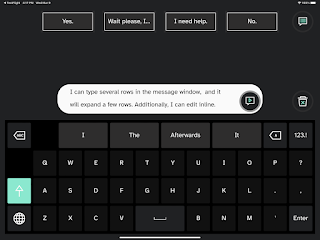
A significant factor in this decision was the need to help ALS clients who need a voice today, but perhaps don't qualify for funding at this stage of their journey. If they have an iPad, they can have a voice. Later, if they need DME with eye gaze, they can get a TD Pilot funded, and transition straight to that mode of access, without having to learn new software. Ultimately, we've been finding that a number of folks are appreciating the software regardless of age or disability. 

TD Talk offers a large selection of languages and voices to express yourself as naturally as possible. Allowing for fast, predictive sentence construction, and easy in-sentence editing, this is a remarkably lean, fast, and efficient communication app. 

User's will also appreciate the simple keyboard, along with a few quick-fire phrases to balance speed with flexibility. 

Take a look at it, I suspect you too will be impressed. 

Happy therapy!

Monday, November 15, 2021

Accurate AND precise eye-gaze on an iPad!

 Hey Tek-ninjas! Today is a big day for Tobii Dynavox and AAC users. This morning, Tobii Dynavox introduces the TD Pilot.  TD Pilot provides native integration of eye tracking in iPadOS and has been certified to meet Apple performance standards. It enables communication and full use of iPad apps for people with disabilities, via eye control and other access methods. The TD Pilot offers what is currently the only MFi Certified Eye-tracker on the market. 

While there are a few other companies that had dipped there toes into the eye-tracker world with iPads already, none of them (that I know of) have an equivalent offering with Region Base Interaction (RBI), essentially pulling the user's eye to the chosen target with accuracy and precision - indoors OR outdoors. Additionally, TD Pilot uses Smart bright pupil and dark pupil tracking technology which means that the eye tracker is always adjusting to the light conditions and the user to ensure the optimal user experience.

Just like on the proven Windows-based iSeries, TD Pilot has the celebrated Partner Window, and the same powerful speakers. 

TD Pilot when funded, comes with TD Snap, TD Talk, and TD CoPilot. The first many AAC stakeholders are familiar with. TD Talk is a brand new efficient text-to-speech app, and TD CoPilot is the companion app which provides calibration, software updates, and battery status. 

Everyone I've spoken with who has had a chance to test drive the TD Pilot has been very impressed. If you are going to be at ASHA this week, come by, check one out, and say hi to me! If you can't make ASHA, but want to see one for a possible user, reach out to your friendly neighborhood Solutions Consultant. They will be able to help you determine if the TD Pilot is right for you or your client(s)!

Happy therapy!

Wednesday, February 6, 2019

How to install an app on an older iOS platform

Picture icon of Apple mobile device operating system
Hey Tek-Ninjas! Today's blog is a quick iOS app tip which will hopefully be useful for you.

Recently a colleague reached out to me, indicating that she was trying to download the Snap + Core First App on her mini iPad. Her dilemma was that iTunes kept telling her that she needed iOS 10 or later. Her mini iPad runs iOS 9.3.5 and would not install the newer version.

I knew there was a solution, but couldn't remember it.  Consequently, I had to send this tech-question up the ladder to my senior tech guy, my 17 year old son, Ben.

Ben quickly got back to me with the following:

So- the only way Apple will allow you to download an older version is if you already own the app. Once you find it in the “purchased” section of the App Store you can select “download” and it will give you the option to download an older version that is compatible with device

So what do we do if she hasn’t purchased it before? Go on a newer device like an
Picture of icon for Snap Plus Core First icon
Add caption
iPhone or iTunes on a Mac (the latter is preferable) that is associated with her iPad’s Apple ID and can purchase the app. Buy it from there, and then you will find it listed in the “purchased” section of her iPad’s App Store. Then you can download, and receive the “older version” 


In the specific case at hand,  my colleague needed to download the "free" version. Once she logged into her "mytobiidynavox" account within the app she gained full functionality.

I can see this issue presenting with a variety of apps, and so I hope this is useful to you all. Thanks to Ben!

Happy therapy!


ADDENDUM: 
So the clinician who asked for help emailed back to tell me she had to take a few extra steps. She shared the following:

A few extra steps were involved because essentially the newest version of iTunes on Macs does not support connections with iPad. I had to uninstall my current iTunes and re-install an older version in order for the steps from your blog to work. Essentially, the iPad is too old and iTunes is too new.

I hope this is useful for folks!

Wednesday, May 16, 2018

AAC meets the iPad #ferreal

Hey Tek-Ninjas! Tobii Dynavox has some new "Stuff" and I'm way stoked about it.

You need an AAC solution? You prefer iOS? Or you already have an iPad? But you need it to be a dedicated speech device? Check out the
Speech Case.
The Speech Case with iPad, is an iOS-based speech tablet designed for AAC with extra loud speakers, switch access, and the Snap + Core First communication app. This is a true AAC communication solution!


With the specially designed case, built-in handle, and kickstand, mounting is also possible with pre-drilled screw holes for an external mount plate. The Speech Case offers unmatched sound from the integrated, outward-facing speakers means quality and clarity optimized for speech while also providing the loudest sound on the market. The Speech Case also offers multiple Access Methods like switch-scanning, touch, and touch with keyguards.

Youtube Thumbnail Speech Case.PNG What if you already have an iPad? Well, the Speech Case and Speech Case Pro can be purchased alone, or bundled with Snap + Core First. Speech Case is only compatible with 9.7" 5th and 6th generation iPad and the Speech Case Pro is only compatible with 12.9” 2nd generation iPad Pro. Pricing can be found on the website, but varies dependent on your configuration needs. 

BUT, if you are buying JUST the Speech Case, the 9.7 size retails for $399, and the 12.9 retails for $599. 

Hajima! 

Wednesday, September 30, 2015

The Gift of Tech-y Children

Hey Tek-Ninjas! So today, my 14 year old son posted the following message on his Facebook account:
PSA to all friends with iPhones who updated to the latest OS - go into your settings, select "Cellular", scroll to the very bottom of the menu and switch off the "Wifi Assist" feature. Apple has sneakily added this to iOS 9. It automatically uses cellular data when wifi connection is poor, even when connected to your network.
Here is a picture map of what you are looking for
I love that my Apple Fanboy continues to teach me about the products which I so enjoy using! 

Happy Therapy!


Thursday, December 18, 2014

Quick Tip: Screen Sharing

Hey Tek-Ninjas! Here is a quick tip that my 13 year old shared with me.

If you have Yosemite operating system on your Mac, AND the iOS8 or newer on your iPad, iTouch, or iPhone, you can share what ever is on your iPad screen to your computer, even recording your work if you choose.

Check out the video below


Happy Therapy!

Tuesday, October 28, 2014

Guided Access on your iDevice got even better.

Time Limit, bottom right
Tek-Ninjas, if you are like me, you were excited by the Guided Access feature on your iDevice, when it came out a few years ago. Well, with the new operating system, OS8, there are some improvements, which make the feature even better!

To start with, the adult can now set a timer for how long the app will run. The interface is incredibly simple. 

Within the timer function, the user can designate what the time bell sounds like, and also have a warning voice let the student know when the time is almost up. This can help tremendously with transitions. 

The timer function can be used to help students know how long they "must" participate in a given app, or how long they "get" to play a game. 

Pretty cool, huh?!

Happy therapy!

Wednesday, March 12, 2014

AppleVis Exploring Apple's Work

I have always been impressed by both Microsoft and Apple's attention to how folks with Visual Impairments might access their operating systems. Both companies have historically offered tools embedded in their software, at no additional cost. Granted the quality has varied from year to year.  Often, because they are in the business of selling operating systems, and not accessibility equipment, finding information about these features is not as easy as one might like.


Recently, my brillant colleague and VI teacher, here in the schools sent me a link to AppleVis, showing "what's new and changed for blind and low vision users in i0S7.1. AppleVis is a community-based web site that is managed by a small number of volunteers. They are NOT Apple.

I was impressed by the work Apple continues to do, and frankly how big can the market share be for them? This is good work, with minimal financial gain. (okay, I will quit hero-worshipping Apple for a few minutes).

According to AppleVis, there are 6 new Accessibility features in i0S7.1, including 3 contrast settings rather than one, allowing users to choose an option that best supports their vision. One other feature is the ability to enable Bold Text for icons, text on i0S labels, keyboard, and the calculator. For the other four, visit their page, 'cause I don't want to steal all their thunder.

The page also lists the 25 improvements that have been made to pre-existing features including significant changes to VoiceOver functions.

In addition, the site offers up 13 bugs still found in the system. Love that they are willing to share the successes, as well as what still needs to be worked on.  It's comforting to find that an issue your having is not just yours alone.

Finally, I found the comments from other readers to be very edifying, and as useful as the official info. There are some smart users out there!

Intrigued by the wealth of info, I wanted to look a bit closer at who AppleVis is. This is pulled from their site:
A community-powered website for blind and low-vision users of Apple's range of Mac computers, the iPhone, iPad and iPod Touch.
AppleVis is a rich resource that strives to empower the community by offering multiple pathways to access and share relevant and useful information. As a community, we seek to encourage and support people in exploring the many ways in which these mainstream products and related applications can offer opportunities to the vision-impaired for personal enrichment, independence and empowerment.
AppleVis also offers resources and mechanisms for raising awareness of the accessibility of Apple products and related applications, and for promoting further advancement in accessibility.

Membership is free. They do however welcome donations, as they are volunteer run, with no sponsorship. The site has several pages to explore apps, a forum for users to share ideas, a well maintained blog, Podcasts (tech oriented), Guides, and App Deals are listed, and finally Accessory Reviews. WOW! I am blown away by the thoroughness of their work.

If you or someone you know has visual impairments, this site seems like a necessity!

Happy Therapy!